Showing posts with label Research. Show all posts

Does Extreme Isolation Drive Mountaineers to Madness?

The Himalayan Times has an interesting story today that at least provides some food for thought and should spark some interesting conversations. A new research study indicates that extreme isolation in the mountains can actually drive high altitude climbers to madness, greatly increasing their risks and the chances of an accident.

The study comes our way from scientists from Eurac Research and the Medical University of Innsbruck, which has discovered a new affliction that is defined by isolated high-altitude psychosis. Researchers say that this condition can impact those trekking and climbing above 7000 meters (22,965 ft).

One researcher quoted in the story said “The mountaineer who suffers psychotic episodes may think he/she is being pursued and starts talking nonsense or changes the route without rhyme or reason.” They were also quick to point out that while the symptoms of this condition are purely psychotic, and while they are linked to altitude, they don't appear to be connected with high-altitude cerebral edema – aka HAPE or altitude sickness. For this reason, it should be considered a completely different and distinct condition.

The doctors conducting the study say they are still exploring exactly why the psychotic episodes occur, speculating that they have something to do with lack of oxygen, the isolation that comes from being at high altitude, stress, and perhaps the early signs of swelling in the brain. Further studies and research are needed to completely understand what is occurring to help diagnose the situation.

This study is obviously an intriguing one, and would help to explain some of the strange and tragic stories we've heard from high altitude expeditions in the past. It is too early to speculate on this topic and more research needs to be done to better understand it. Still, it is potentially an explanation as to why some climbers have acted so strangely when under stress at altitude. It is interesting to learn that it might not be caused by HAPE after all.

Read more about this topic here.

Researchers Discover Shark That May Be 500 Years Old

Researchers studying Greenland sharks in the Arctic have found one that just might be the oldest living vertebrae on the planet. Based on its size, and using radiocarbon dating on tissue from its eye, this particular shark is estimated to be somewhere between 272 and 512 years old, which means it could have been born as far back as 1505 AD.

This particular individual was first spotted by scientists who were conducting a catch and release program during which 28 Greenland sharks were examined. It was notable for its size, stretching 18 feet (5.4 meters) in length, which was an indication of its longevity for sure. Do to its slow metabolism and life in icy waters, the species only grows at a rate of about 1 cm per year.

Unlike other sharks, which have hard, calcified tissue that can be used to detmeurine their age, a Geenland shark has mostly soft tissue instead. In order to determine the age of individuals scientists have begun using radio carbon dating, which examines cells that are taken from the eye. In this case, the dating process gave them the estimated age-range for this particular shark.

To be certain, the 272 to 512 year range is a wide one. The researchers say it is unlikely that this particular shark is actually 500+ years old, but it is quite possible. Their research indicates that it is most likely around 390 years old, which is still pretty mind blowing. Even if it is relatively young at 272 years of age, it is still quite impressive.

Greenland sharks are particularly difficult to observe in the wild since they live in remote places, swim through extremely cold waters, and can dive as deep as 9100 feet (2774 meters). But, researchers are doing their best to learn more about these creatures, and determining their lifespan is part of that process. Just how long they can live is a mystery, but it seems likely that there might be some hardy individual members of the species that are indeed more than a half-century old.

Nature is awesome.

Antarctica 2017: Ben Saunders Set to Depart for the Antarctic Today

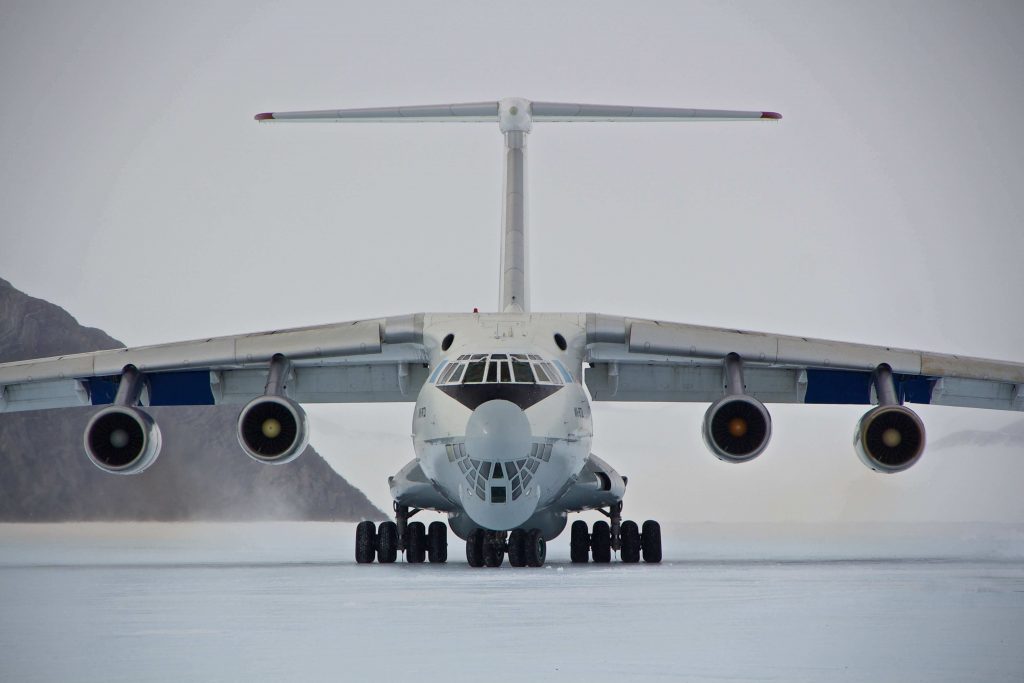
Yesterday I posted a story about the start of the Antarctic expedition season that is about to get underway, and now it looks like it may be officially happening. British polar explorer Ben Saunders has updated his blog today to share the news that he is awaiting final confirmation from ALE regarding the first flight to the frozen continent this year. That flight is designated to deliver supplies and crew to the Union Glacier camp, which serves as a base of operations throughout the austral summer, but Saunders will also be delivered to the ice aboard a massive Ilyushin IL-76 aircraft.

Ben says that he has spent the better part of the past week or so getting ready for the start of his journey. That includes organizing and packing his gear and supplies, charging his electronic equipment, checking last-minute things off of his to-do list, and clearing all of the email out of his inbox.

Now, with all of those things finished, he's truly ready to get started. He was awaiting a final weather report this morning, but as of this writing it appears that things are looking good for Saunders to launch his daring and demanding expedition. Remember, he'll be attempting to become the first person to complete a solo crossing of Antarctica – via the South Pole – completely unassisted and unsupported. That means it will be just him, all alone on the ice, skiing across the frozen expanse, dragging a heavy sled behind him the entire time.

If all goes as expected, Ben should arrive at the Union Glacier Camp following a 4+ hour flight. Once there, he'll likely spend a day or two before being dropped off at the starting point of the expedition, and then he'll truly be alone. The journey is expected to take upwards of two months to complete, so he is facing quite a bit of isolation over the coming weeks.


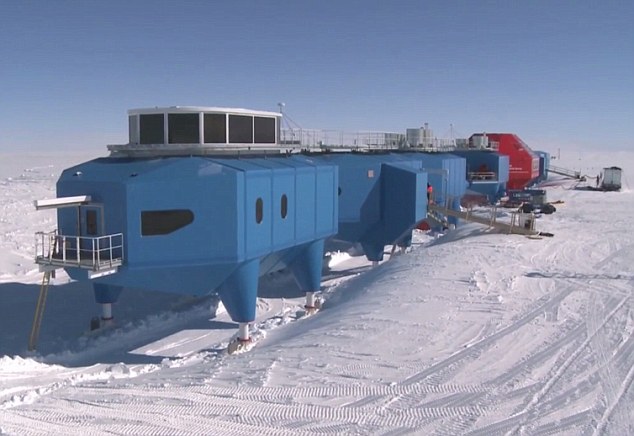
Meanwhile, it has been revealed that the British Antarctic Survey Halley VI Research Station will not remain open during the Antarctic winter of 2018. The base is only now being staffed for the summer months, but next year it will be closed down completely for safety reasons. You may recall that the movable base was relocated to a new spot last year to avoid potential issues with cracking ice. It seems that more cracks have opened around the laboratory, prompting further concerns about the new location as well.

One of those cracks opened just last year, but has grown dramatically in size in recent months. The fear is that another large section of Antarctic ice could calve off, taking the research station with it. The 14-member crew that were expected to remain there will be redeployed to other bases. It is unclear at this time whether or not there are plans to move the Halley VI once again. If that were to happen, it wouldn't occur until next fall at the earliest, leaving the little station to fend for itself in the long, cold Antarctic winter.

That's it for now. I'll share updates on the unfolding Antarctic expedition season as we get them.

A Giant Hole Has Opened in the Antarctic Ice and Scientists Aren't Sure Why

We're now just a few weeks away from the start of the Antarctic ski season, and even now there are explorers putting the finishing touches on their plans to travel on foot to the South Pole. As the austral summer returns to the frozen continent, we're now taking stock of what is happening in that part of the world, and scientists of discovered something fascinating, perplexing, and possibly worrisome all at the same time.
Using satellite imagery, researchers have identified a large hole in the ice on the Antarctic continent. Of course, holes develop in the ice all of the time. Scientists even have a name for them, calling them polynyas. But what makes this one different from most is that it is incredibly large and it is located miles from the place where Antarctica meets the ocean, which is typically where these phenomenon form.

In this case, the polynya is roughly the size of Lake Superior and is found in the heart of the Weddell Sea to the east of the Antarctic Peninsula. This particular hole has been spotted once before way back in the 1970's when the first satellites began photographing the continent. It is believed that in this case, the polynya was created when warm water in the Southern Ocean rose to the surface, pushing through the cold freshwater that sits on top. That warm water then acted as a vent, heating up the ice and causing it to melt rapidly. So rapidly in fact that it was able to create the hole even during the dead of winter.

The scientists studying the Weddell Polynya as it is now called have described it as a natural variable that has proven that their climate models are actually providing an accurate depiction of what is happening to our planet. Originally researchers thought that the hole couldn't form again as climate change increased precipitation in the region. But newer models did predict that it would reoccur as conditions shifted. The fact that it has happened again is demonstrating that current climate models for the Antarctic are on track. Even though this appears to be a natural phenomenon, it is still falling into line with the shifting climate patterns across the world.

This is just another strange occurrence in the Antarctic along with the large chunks of ice that we've been seeing break off over the past few months. Whether this is all a natural occurrence or the result of man's impact on the planet, it doesn't really matter at this point. The Antarctic has long been viewed as the canary in the coal mine when it came to climate change, and this canary is in dire straits.

Video: Get a Whale's Eye View of Antarctica

As part of a research project to study and protect whales in the Southern Ocean, researchers have attached noninvasive cameras and sensors to some humpbacks. This has allowed them to track the animals and learn more about their habits. It has also allowed them to capture footage like that found in this short clip, which follows a whale as it zips through the water just off the coast of Antarctica. It is a unique and beautiful way to get a look at that part of the world as only a whale sees it.

Polar Bears Trap Russian Research Team Inside Arctic Base

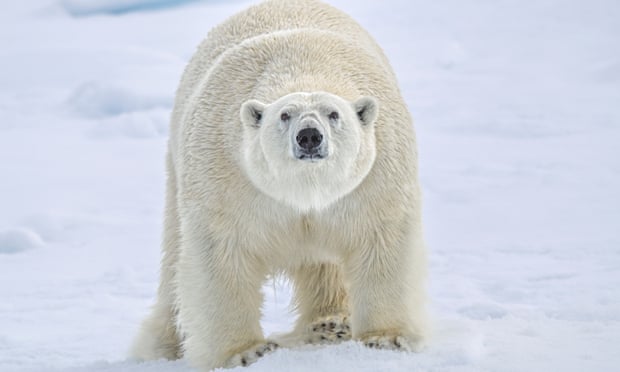
Think your job is rough? Consider the challenges that a team of five Russian scientists have been facing as they conduct weather research on the remote island of Troynoy in the Arctic Ocean. According to a report from TASS the group had become trapped inside its meteorological observation center by a group of ten polar bears who have taken up residence just outside the base.

Normally, in order to keep the bears at bay, the scientists use flares and have dogs at the base to scare off the animals. But, the team had run out of flares, and according to Mashable the bears even killed one of the dogs. Because of this aggressive nature, the researchers have had to abandon some of their projects, and had been instructed to only leave the base when absolutely necessary.

It was originally reported that it would take weeks to deliver new flares and dogs to the station, but apparently relief came earlier today when a passing research vessel made a detour to lend a hand. The ship resupplied the team with flares, which were used immediately to scare off the bears. The next resupply ship wasn't scheduled to arrive for another month, but this should help buy the team some time.

Apparently, the bears gather near the base to wait for the Arctic Ocean to freeze. That typically occurs in late October or early November, at which time they'll depart the area and head north. Considering the current state of the arctic sea ice, it may take longer than usual before the bears begin their migration, and it is possible that they'll return to that location again in the days ahead.

In the past only about 4-6 bears have spent their summers on Troynoy, but apparently this year there are at least 10, including some large female with small cubs as well. One of the females has even been spending her nights just below one of the windows of the weather station, making it even more difficult for the team to sneak outside to record readings for their research.

Hopefully there will be some relief for these scientists soon. While watching polar bears up close sounds like an amazing experience, being locked inside and unable to go out doesn't seem like a lot of fun.

Scientists Discover Massive Canyon in Antarctica

It is fascinating to me how much we are still learning about our own planet. It seems that despite the fact that we are sending space probes and rovers to other Mars, Pluto, Jupiter, comets, and other celestial bodies, we continue to discover new things right here at home. Case in point. Last week it was revealed that a team of researchers have discovered a massive canyon under the ice in Antarctica. It's so big in fact that it could dwarf even the Grand Canyon itself.

The canyon was discovered using satellite imagery and ground penetrating radar that was pulled along behind snowmobiles and small aircraft. This giant gorge is located in the western region of the Antarctic near the Ellsworth Subglacial Highlands. It is said to be buried under several miles of ice, but its dimensions are staggering to say the least.

According to preliminary estimates, the canyon is believed to be 3 km (1.9 miles) deep, and more than 25 km (15.5 miles) across. It is also believed to run more than 1000 km (621 miles) in length, and even more amazingly it reaches 2000 meters (6500 feet) below sea level at certain points. In comparison, the Grand Canyon 1.8 km (1.13 miles) deep and stretches for 433 km (277 miles) in length.

The scientists studying the Ellsworth region aren't sure how old the canyon is exactly, although they do know that Antarctica has been covered in ice for at least 34 million years. Over that time, the glaciers that cover the area have shifted dramatically, ranging in thickness while shaping the surface found underneath them. Because of its immense size, it is believed that it was ice – not an ancient river – that carved this massive gorge.

Unlike the Grand Canyon, it is unlikely that humans will ever see this natural monument. Because it is covered in snow and ice, it would take millions of more years – not to mention dramatic shifts in climate – for it to ever reveal itself. Still, it is fascinating to know that this place exists, and it makes you wonder what else is still out there, hidden under the ice.

Evernote Notebooks = Your Filing System

[ATTN:  This article was originally published on 5 May 2014. It has now been moved here from the old blog host and it will require updating soon.]

Create Evernote notebooks that mimic your personal filing system. Assuming you already have a filing system or have an idea of what you would like your filing system to be. If you don't you might do what I do and file by surname. There are many ways you can file and the method you use should be whatever works best for you and how you think. For more ideas see: http://www.CyndisList.com/organizing/ 

TIP:  Pick one system that works for you. Then duplicate that across all of your research areas: paper files, paper notebooks, computer files, cloud files, research notebooks, bookmarks for research, e-mail, etc. If you use the same filing system in each function you will have an easier time finding what you need. 

You can have up to 250 notebooks within Evernote. Notebooks can be stacked one level deep under a top level. So, my personal set-up has a stack for Genealogy Research and under that I have one notebook for each surname I work on and one notebook for some of those localities in which I am doing a lot of research on several families. 

I have stacks for my other genealogy activities: Genealogy Business, Genealogy Conferences & Travel, Genealogy Education - Me, Genealogy Lectures & Speaking, Genealogy Research - Others, Genealogy Volunteer Stuff. I also have stacks and notebooks for non-genealogy stuff (when do I have time?) including Cyndi, Evan (my son), Mom (mine), Household, Recipes, Receipts, etc.

The screenshots below show my stacks and notebooks. The screenshot on the right shows all of the notebooks currently under the Genealogy Research stack.


Evernote for Every Genealogist
Copyright © 2014 Cyndi Ingle. All Rights Reserved.

The Evernote Webclipper

[ATTN:  This article was originally published on 5 May 2014. It has now been moved here from the old blog host and it will require updating soon.]

The first thing you should do after installing Evernote on every one of your devices is to install the Evernote Webclipper in your web browser:  http://evernote.com/webclipper/
The webclipper appears as a small Evernote elephant button on your toolbar. Upon visiting a web site you can clip information from a site directly into your Evernote notes. The clipper launches a menu that gives you the option to clip an entire article which the clipper tries to identify as the main text on the site, a simplified article without ads and extraneous graphics, a full page that includes everything, a bookmark only, or a screenshot of what appears on your screen at that moment. Choose which option you like and save it. You also have an option to share a clip with a link, by Facebook, Twitter or e-mail. 


Prior to saving the clip you can also choose the notebook in which you want to file the note and you can add appropriate tags. The newest versions of the webclipper also include markup options that allow you to add notations. You can markup with a highlighter, a marker, stamps, text, arrows, a pixelated blurring tool, and a cropping tool to resize the clip.


Using the Webclipper for Genealogy

For genealogy the webclipper means clipping a source for your research. As you research online you will run across bits of text, entire articles, images of records, or web sites that you might want to bookmark and revisit. Clip these things into the appropriate notebook in Evernote and you can refer to them any time you need to, from any of your devices with Evernote installed. As you clip Evernote automatically tracks the date you made the clip, the last date you modified the clip, and the original URL from which you obtained the clip. 


Evernote for Every Genealogist
Copyright © 2014 Cyndi Ingle. All Rights Reserved.

Evernote for Things Other Than Genealogy

[ATTN:  This article was originally published on 30 May 2014. It has now been moved here from the old blog host and it will require updating soon.]

Yes, people. There is a life outside of genealogy. I think. Following are the ways I use Evernote outside of genealogy.

Notebooks:
  • One for me and for each of my other family members - my mom, my son, and my pets. I use them for a lot of things. I keep health-related articles and lists, book series I'm reading, and other personal lists. I keep track of my mother's computer stuff like which inkjet cartridge to buy for her. I keep track of my son's school stuff including upcoming college and scholarship applications. I have a copy of the user's guide for his new electric razor so that I always know what replacement blade to buy him and when to remind him to change it.
  • One for Recipes. I clip recipes online into this notebook and tag them with recipe category names like Appetizers, Beef, Chicken, Pasta, Salads, etc. An added benefit is that this notebook is automatically integrated into the Evernote Food app on my iPhone. So, I always have a recipe and a shopping list with me at the grocery store. https://evernote.com/food/ 
  • One for the Household. This one includes household maintenance to-do lists, reference material about household maintenance, a timeline of what household repairs I've done and how much they cost, holiday planning and lists, PDF copies of household product manuals (instead of keeping all those papers and books), and much more. Most useful recently: a chart I found online that told me which of the new light bulbs to buy that match an old 60w lamp.
  • One for Travel. Notes inside have packing lists, e-mails with flight information, itineraries, sight-seeing info, hotel confirmations, etc.
  • One for Computers. This one holds articles, tips and tricks I've run across, a list of my computers and hardware along with model numbers and serial numbers, ink jet cartridge numbers, etc. 
Things You Might Put in Evernote:
  • Grocery lists
  • Take-out menus
  • To Do lists for various areas of your life
  • A copy of your eyeglass prescription
  • A list of your pharmacy prescription numbers
  • A health note or notebook for each family member
  • A note with a list of all of your doctors with their contact information
  • A health notebook for yourself with a journal, lists of goals, and helpful articles
  • A spiritual/inspirational notebook with a journal, goals, quotations, articles, and ideas
  • Inventories of items in your household (i.e. tools, workbench, gardening, kitchen, books, movies, video games, jewelry, craft supplies, collections, etc.)
  • A notebook for your other hobby (who has time for another hobby outside of genealogy?)
  • A notebook for your garden to keep track of planting dates, fertilizing dates, seeds/plants used, etc.
  • A list of all of your magazine subscriptions, with expiration dates and prices
  • Receipts
  • Business cards
  • Membership/rewards cards
  • Clothing sizes
  • Pet vaccinations
  • Anything else that might unclutter your office, lighten your purse, and help you head more to a paperless life
Evernote Apps & Compatible Apps I Use:


Evernote for Every Genealogist

Copyright © 2014 Cyndi Ingle. All Rights Reserved.

Tips for Success and Ease of Use with Evernote

[ATTN:  This article was originally published on 30 May 2014. It has now been moved here from the old blog host and it will require updating soon.]

Here are a variety of tips and ideas for helping to make Evernote easier to use and to make it a great genealogical research tool.

General Admin:
  • Create an entry in your e-mail contacts/address book for your Evernote e-mail address. This makes it that much quicker to forward important messages from your e-mail to Evernote.
  • Setting up notebooks and choosing option settings both tend to be much easier from the desktop version than from the web or other devices. So, I do all my setup and administration on the desktop.
  • Be aware that the different versions of Evernote all have the same basic functionality, but they may behave different from one another based on the operating systems: desktop, iOS, Android, and web-based.
  • Create Shortcuts to specific notebooks that you use more often than others. These get put at the top of the list on the left, so they are easier to get to. Right-click on the notebook and add the shortcut.
Notebooks:
  • Create a notebook named "_Inbox" with the underscore up front to guarantee that this notebook will be listed at the top. Make _Inbox your default notebook. Then all notes that are e-mailed to Evernote or clipped to Evernote without being filed or tagged will show up in the _Inbox for you to properly administer later.
  • To make a notebook your default notebook:
    • In the web version, right-click on the notebook and choose "Properties" and then "Make this my default notebook." 
    • In the desktop version, right click on the notebook, choose "Notebook Settings" and then "Make this my default notebook." 
  • Create a notebook for "Templates" and store some prepared blank templates for various research processes. When you start a new research process for a person in your family history, copy the template into the appropriate notebook and customize it as needed. In my setup I call mine "_Templates" with the underscore in front so that the notebook appears near the top of the list like the "_Inbox" notebook does. I have created some templates in Evernote to share with all of you. Feel free to use these for your personal research:
  • Set up notebooks as recommended in Evernote Notebooks = Your Filing System
    http://evernotegenealogy.postach.io/evernote-notebooks-your-filing-system
    • For each surname
    • For each one-place study
    • For volunteer projects
    • For conferences, seminars, and other genealogical education
    • For research you do for others (friends or clients)
Notes:
  • Create tags for those every day things you might need reminders about:
    • To Read
    • To Buy
    • To Research
    • To Call
  • File and tag notes as they come in. Don't let them pile up the way you let all that paper pile up on your desk. Yes, I know what your desk looks like.
  • Create notes with pre-written queries or replies about specific ancestors. Store them in each surname notebook. The pre-written text can easily be copied and pasted when participating in e-mail, mailing lists, message boards, or social networking.
  • Within each appropriate surname notebook, create a note with a list of all the cousins you have met online. Include their name, e-mail address, contact information, and their relationship within that family. Keep a log of your correspondence with these cousins, including any trading of information, photos, files, and documents between you. See Cyndi's Cousin Index Template - http://goo.gl/tu65pC 
  • Create a notebook for your DNA testing. Inside that notes for:
    • Each DNA kit's registration information, kit number, login ID & password, name of person tested
    • DNA matches found, including all contact information
  • Create a notebook for your Unidentified Photos. Inside that, notes for each photo. The notebook and/or notes can be shared publicly in social networking forums to gain help identifying the people in the photo.
  • Within each surname or one-place study notebook, create a Table of Contents note that points to all of the other notes within. A TOC can be created in the web version by right-clicking on a note, choosing Copy Note Link, then pasting the link into a new, blank TOC note, one at a time. In the Evernote desktop versions you can select a whole batch of notes and then right click and create the TOC all at once. Obviously, this is easier and preferable. The TOC list can also contain checkboxes so that it can be used as a to-do list if you like.
  • Create a "To Do" note in each surname or place name notebook. Use the checkboxes to keep track of which items you complete. The To Do list for each notebook will be different depending on where you are with your research.
  • You can copy and paste from web sites or other documents into Evernote, but the formatting will always come with it. To paste as plain text and remove formatting use Ctrl+Shift+V.  A regular paste is Ctrl+V. There is also an "eraser" icon on the formatting toolbar that will remove formatting after the fact.
  • For those of you who publish your own web sites, Evernote can be used to store snippets of code and other notes pertaining to maintaining your site. Bloggers can use it to plan their blog posts.


Evernote for Every Genealogist
Copyright © 2014 Cyndi Ingle. All Rights Reserved.

Evernote Email for Genealogy

[ATTN:  This article was originally published on 30 May 2014. It has now been moved here from the old blog host and it will require updating soon.]

Your Evernote account provided you with an Evernote email address.
  • To find your email address in the desktop version go to Tools > Account Info
  • To find your email address in the web version click on your name in the upper right corner, go to Account Settings
  • To find your email address in the iPhone and iPad apps click on the gear next to your name in the upper left, go to General > Evernote Email Address
  • To find your email address in the Android app click on the icon next to your user name, go to Account Info
So, why do you want or need an Evernote email address? Particularly for genealogy?

  • Keeping copies of key emails in your Evernote notebooks does two important things for you research: 
    • It brings them into the same filing space as your other research notes and documents.
    • It makes them searchable along with the other research notes and documents.
    • Yes, often your email is searchable within the email program. But putting it into Evernote means you do one search across all of your research notes and emails at the same time.
  • When you receive an email query from a potential cousin, forward a copy to your Evernote address to be filed in your notebooks and saved for future reference.
  • When you write a research email include your Evernote address as one of the recipients. A copy of your message will be saved in your notebooks for future reference.
  •  
  • Research trips:
    • Create a notebook for travel.
    • When planning a research trip you may receive e-mail confirmations from airlines, hotels, and conferences or seminars. 
    • Forward confirmations to your Evernote account and keep them in a Travel notebook so that they are easily accessible through the app on your tablet or smart phone while you're at an airport, at the hotel, or in a shuttle or taxi. 
    • Better yet, instead of forwarding them, use your Evernote e-mail address when registering and the original confirmation will go straight to your Evernote.
    • No more print-outs for your trips. Put all relevant travel info into one notebook and they go with you everywhere you go. For example: airlines confirmation, hotel confirmation, seminar registration, weather information clipped from the web, travel checklist, packing checklist, tourist info, maps, and anything else you would normally print and take with you.
    • You may want to encrypt any text within notes that contain passwords or sensitive/private information. Encryption is done within the desktop version for Mac and Windows:  http://evernote.com/contact/support/kb/#/article/28451608 
  • Genealogy software:
    • Create a notebook for your genealogy software program.
    • Bring all of your genealogy software info into one filing space in Evernote.
    • Include clippings from the web about how to use the software, and hints or tips.
    • Forward email newsletters to Evernote when they contain hints or tips that you want to keep and refer to later.
    • Forward email confirmations when you purchase programs or upgrades.
    • Forward any email correspondence you have with tech support when dealing with specific issues.
    • You may want to encrypt any text within notes that contain passwords or sensitive/private information. Encryption is done within the desktop version for Mac and Windows:  http://evernote.com/contact/support/kb/#/article/28451608 
  • DNA research:
    • Create a notebook for your DNA research.
    • Bring all of your DNA research into one filing space in Evernote.
    • When testing multiple family members and/or multiple DNA companies, create a master note with a table that includes the DNA company information, names of people tested, kit numbers, passwords, etc.
    • Forward email confirmations to Evernote when you purchase kits. These usually include registration or login information.
    • Forward email notifications that tell you that you have matches or new people to contact.
    • You may want to encrypt any text within notes that contain passwords or sensitive/private information. Encryption is done within the desktop version for Mac and Windows:  http://evernote.com/contact/support/kb/#/article/28451608 
  • Society memberships:
    • Create a notebook for your genealogical and historical society membership(s).
    • Create a master note with a table that includes a list of all your societies, your membership numbers, etc.
    • Forward email confirmations to Evernote that include your membership information with expiration dates.
    • Forward email newsletters that have information that you might want to refer to later.
    • Set an Evernote reminder on the note to remind you when it is time to renew your membership.
    • You may want to encrypt any text within notes that contain passwords or sensitive/private information. Encryption is done within the desktop version for Mac and Windows:  http://evernote.com/contact/support/kb/#/article/28451608 


Evernote for Every Genealogist
Copyright © 2014 Cyndi Ingle. All Rights Reserved.

Evernote Tags for Genealogy

[ATTN:  This article was originally published on 7 May 2014. It has now been moved here from the old blog host and it will require updating soon.]

One of the powers behind Evernote is the search function. And tags for notes make that search even more powerful. Think of tags this way: they function just as tabs do in your physical notebooks. They help to sub-divide, thus sort, the contents within a notebook.

You can create up to 10,000 different tags. You can have up to 100 tags per note, but that is overkill. I suggest you give notes at least once relevant tag. Two or three should do it in most cases.


Suggestions for tag types:
  • Family group name(s) within a surname notebook
    For example, within my INGLE, ENGLE, ENGEL notebook I have tags for David Henry Ingle, Adam Monroe Ingle, Mathias Engel, etc. These are my 1st, 2nd, and 3rd great grandfathers. I then tag notes for anyone who is a descendant of these people.
  • Individual's name
    This can be used if you want to tag each individual person in a family group. However, I wouldn't do this for all people in your research. You have a total limit of 10,000 tags. I would only create tags for individuals that have a high profile in your research.
  • Maiden names
    Because a notebook will be for the husband's surname, tagging a maiden name of a wife helps you sort.
  • Record type
    For example: Deed, Census, Will, Taxes, Military, Pension, Map, County History, etc.
  • Repository name
    For example, specific archives, libraries, or web sites used for the research contained within the note. I have notes tagged "FHL" for the Family History Library or "ACPL" for the Allen County Public Library.
  • Tasks to Accomplish
    For example:
    • "Add to Genealogy Database"
    • "Find Original Source"
    • "Create Citation"
    • "Confirm"
    • "More Evidence Needed"
    • "To Read"
    • "To Transcribe"
  • Genealogical Education
    • ____ Webinar Notes
    • ____ Conference Notes
    • ____ Lecture Notes
    • Syllabus/Handouts


Evernote for Every Genealogist
Copyright © 2014 Cyndi Ingle. All Rights Reserved.

Evernote Was Made For Genealogy, Part 2

[ATTN:  This article was originally published on 5 May 2014. It has now been moved here from the old blog host and it will require updating soon.]

In the first post I described what Evernote is and what types of notes we might create for genealogy.
http://cyndislist.blogspot.com/2015/06/evernote-was-made-for-genealogy.html
What I didn't say in that first post requires a post of its own. If you aren't already keeping a research plan and research log in some sort of research workbook (physical or virtual), it is time to do so. And the research workbook is why Evernote was made for genealogy.

I became a genealogist in 1980 because of a high school project, a family tree book filled out by my maternal grandmother, and a trip taken by my Aunt Daisy to visit all the relatives in Indiana and Virginia. My first research notes were copies of family group sheets and pedigree charts that she had filled out and had made copies for me. As she started talking about the people she met I made notes in the margins and on the backs of the papers. As I moved on in my genealogical learning process I started my own 3-ring binders for each surname to store those sheets and to insert new pages with notes and documents. When I finally had space for large filing cabinets I was able to keep everything in hanging files and folders instead of the binders. When I started to visit libraries and archives, and when I went on a trip to visit extended family, I began to use individual steno notepads for each surname I was researching. By 1988 my Dad had purchased a computer and a copy of the first version of Family Tree Maker for DOS for me to use. I went to his house to load all of my family information into the software. By the time I got my own computer I moved my database over and started keeping my research notes in Word documents. As I upgraded through new versions of FTM and then on to Generations, The Master Genealogist, and RootsMagic, I also kept research notes in the miscellaneous or notes fields within the software. Several years ago I purchased a copy of MS Office Student which included OneNote, a program similar to Evernote. So, I played with it for research notes as well. For the last 5 years I have been extensively using Evernote as my genealogy research notebook.

That recap tells you that I've done exactly what most of you have done. In 34 years I've accumulated: paper, forms, photocopies, tablets, documents, post-it notes, letters, scraps of papers, envelopes, photos, conference/seminar notes, business cards, flyers, pamphlets, and numerous electronic notes and digital files stored on hard drives, CDs, flash drives, and on the cloud. Everything I need for my research is scattered across more than 3 decades of genealogical educational growth and technological advances. I need to bring everything into one place, cull out the stuff I no longer need, and better organize the stuff I need to keep. Computers and software should make our research easier. This is where Evernote works for me.

  1. I can scan all those scraps of paper and place them in Evernote. The scraps are now all in one place and they all become searchable.
  2. I can keep research notes in folders by surname, just as I did with tablets and notebooks. But now those notes are searchable across all notebooks at one time. So, wherever there is a person that appears in more than one family the search will find them.
  3. I can have more than one type of media contained in one research note. For example: a selection of a web page clipped into a note, marked up with Evernote webclipper tools, and typed notes above/below that clipping that explain why I made the clip, what I intend to do with the clip, and how it applies to whatever I'm doing. Another example: an image and a PDF file can be stored in the same note together, along with typed notes or handwritten markup in the note. I could have a scanned image of an obituary and I can add personal notations and transcribe that obituary in the same note. This would be helpful whenever the scan of the image isn't the best quality. Here's an example of a U.S. census record found on Ancestry.com. I clipped the text from the search results on the site into a note. Then I clipped the original census image into the same note:  http://goo.gl/i7tP94. In the old days we might have printed a page with each and put them together into a sleeve protector in a notebook. Now they are in digital format and searchable.
  4. Having my seminar notes in Evernote along with my research notes means that I find new resources to use in my research. For example, if I do a search on Virginia or Indiana or Dodge County, Wisconsin up pops my research notes for ancestors from those areas along with those notes I took at a recent genealogy conference about how to do research in those areas.
  5. Having my research notes all in Evernote means I can access them anytime and anywhere. I don't have to lug that heavy notebook or multiple tablets with me anymore. And how practical is it to haul around a large 4-drawer filing cabinet with you? I have my notes with me on my phone, my iPad, my Chromebook, and my laptop. And because Evernote is also available on the web I can access it from any library and even when I'm visiting a friend's house.
Recently, while giving my lecture on using Evernote I talked about all of the above. A gentleman in the audience asked me why I would bother keeping all of this information in Evernote. Why not just put it all in my genealogy software program? First, we gather data from numerous sources. We may need to evaluate all of those sources and come to a decision about the evidence contained within. That can take time. I don't enter anything into my genealogy database until I'm comfortable with the data and the research and reasoning behind using it. Also, the Notes or Miscellaneous fields in genealogy software programs generally have a size limit. You may not be able to add large chunks of text or attached files, depending on the program. Therefore, Evernote holds all my research notes, while the database holds my research conclusions with source citations.

If you plan on using Evernote to hold all of your research notes and you have a lot of existing files you may or may not want to bring them all into Evernote right away. It depends on the quantity and the quality of the notes. For example, I have some notes from very early on that I know aren't helpful based on my experience today. That is the quality issue. The quantity issue depends on your Evernote account:
  • Both the free version and the premium version have unlimited storage. So all of your notes and files can be stored within--eventually.
  • The free version has a monthly upload allowance up to 60 MB
  • The paid version has a monthly upload allowance up to 1 GB
  • The free version file size for a single note is up to 25 MB
  • The paid version file size for a single note is up to 100 MB
During initial setup you might bring in notes slowly to accommodate the monthly upload allowance. If you store files on a cloud service such as Dropbox, Amazon Cloud Drive, Google Drive, or Microsoft SkyDrive, you can set up links to those files within a note in Evernote. You are making a table of contents via links/bookmarks to your cloud files. You could even do these in individual notes within each of the surname notebooks. Doing this means you still bring your research focus into Evernote and individuals files can be moved into or copied into Evernote later.


Evernote for Every Genealogist
Copyright © 2014 Cyndi Ingle. All Rights Reserved.

Evernote Was Made For Genealogy

[ATTN:  This article was originally published on 5 May 2014. It has now been moved here from the old blog host and it will require updating soon.]

I will admit it. I'm an Evernote junkie. I love this tool and all it has to offer. I started this blog to demonstrate some useful features and to share ideas with fellow genealogists on how to use Evernote to make research a bit more organized and productive. For more ideas, see: http://www.CyndisList.com/evernote/ 


What is Evernote?
  • Evernote is a notebook container
  • Evernote is a note-taking and note-filing system
  • Evernote holds multiple notes within multiple notebooks
  • Evernote is a container for every scrap of paper, every note, and every digital scrap of paper that you save, putting them all in one convenient place
  • Evernote syncs all of your information across the web, your computer, and all of your mobile devices so that your notes go with you everywhere
  • Evernote makes all your notes and files searchable, even within an image
  • Some people use these terms to describe Evernote
    • "everything bucket" 
    • "brain dump"
    • "universal inbox"
  • In short: where you have piles of research notes and printouts and scraps of paper on your desk, on your computer, in notebooks, and in your filing cabinets, you can now put all of those things into one searchable software application - Evernote
  • Evernote overview: https://www.youtube.com/watch?v=Pjn6YkCY2yA 
The types of Evernote notes can be any or all of the following -- and even multiple types contained within a single note if you like:
  • text notes
  • handwritten notes
  • digital images
  • photos
  • audio files
  • PDF files
Evernote notes can be used for storing many things, for example:
  • research notes
  • research logs
  • timelines
  • to do lists
  • checklists
  • post-it notes
  • web site clippings
  • screen shots
  • bookmarks
  • e-mail messages and threads
  • scanned images
  • photos
  • business cards
  • receipts
  • recipes
  • seminar notes
  • webinar notes
  • reminder notes
  • travel notes (i.e. itinerary, flight info, packing list)


Evernote for Every Genealogist
Copyright © 2014 Cyndi Ingle. All Rights Reserved.

Antarctic Research Station Power Failure Leaves Crew In Desperate Conditions

One of the big stories that broke while I was away at Outdoor Retailer was the complete power loss at the Halley Research Station in Antarctica. The remote base suffered a failure of its generators back on July 30, although the story wasn't revealed until last week. The loss of power shutdown all electricity and heat, leaving the base in dire straits in the middle of winter. The skeleton crew of 13 researchers that live there during the offseason were then forced to scramble to find alternate ways to stay warm, while repairs to the generator could be conducted. The blackout couldn't have come at a worse time however, as temperatures plunged to a record low of -55ºC/-67ºF.

In order to focus on the task at hand, which included finding ways to restore power, and stay warm in the isolated base, all experiments at the station were shut down, and the crew was forced to evacuate to parts of the station that had been shuttered for the winter months. Since then, they have been sleeping on the floor of a garage, while they look for ways to get the Halley back up to full capacity. So far, they haven't had much luck in that department, although they have managed restore partial power and heat.

As if the struggle to stay warm wasn't enough of a challenge, storms have been frequent throughout the area surrounding the base in recent days, which has helped to keep temperatures, and the spirits of the crew, low. The sun did finally poke its way through the cloud cover however, and while it doesn't have much of a warming effect this time of year, it has at least helped to cheer the men and women stationed at the base.


It is unclear at this point whether or not full power can be restored without more staff and equipment. Considering how dangerous the winters in Antarctica are, that means that help may not arrive until October or November of this year. It doesn't seem that the Halley team is in any danger at the moment, although they aren't exactly comfortable either. The base, which has monitored atmosphere conditions above Antarctica since the 1950's, is only conducting the most basic of research at the moment, as all reserve power goes to keeping the crew as warm as possible.

The failure of the electrical system stemmed from a large coolant leak in the station's main heating system. That in turn led to the power generators overheating, which led to a complete failure of the system. The team has managed to keep things operating by not putting too much stress on the generators, even at the expense of their own comfort. We are assured that the crew is safe however, and that all efforts are being made to ensure that they stay that way.

Resupply operations aren't scheduled to take place until the start of the austral summer. Hopefully there won't be any further issues until then, at the Halley Research Station crew can maintain the base until help can arrive in a few months.

New Farthest Source Of The Amazon Discovered

Researchers say they have located a new source for the Amazon River and possibly adding an additional 47-57 miles to its overall length, which already extends beyond 4000 miles. But, with all things exploration related in the 21st century, there is some controversy as to whether or not this new location should actually be considered as a tributary for the longest river on the planet.

Since 1971, the Apurimac River has been considered the furthest source of the Amazon, and many explorers and adventurers have operated in the region under that assumption. According to this new report however, the Mantaro River, located in southwest Peru, now holds that distinction.

The researchers who have asserted that the Mantaro is the new source used satellite imagery and topographic maps to study the Amazon and it's numerous tributaries. With GPS tracking points, the team determined that the Mantaro is actually about 10% longer than the Apurimac, which would make the furthest source.


But as I mentioned, there is some controversy afoot. The Mantaro doesn't flow for parts of the year, thanks to a dam that was built in 1974. When defining a "source," most geographers feel that a river must flow uninterrupted. The researchers behind this new finding say that the Mantaro would flow all year if it wasn't for the dam.

Does it really matter where the true source is located? Most would probably say no. But if you're one of the many adventurers who has attempted to travel the length of the river, or explored the Amazon Basin, it means quite a lot. This revelation could invalidate certain past expeditions that paddled the entire river for instance.

Personally, I happen to enjoy that we're still discovering things about our own planet. It is stories like this one that remind us that exploration is important, even in the 21st century. Now, who wants to be the first to go upstream and actually visit the source? I'm in!